Your users see the bugs.Now you do too.
One button on your site. Your users frame the problem right on the screen, add a note, and you receive the screenshot, the page, the browser — everything you need to fix it without guessing.
One script tag · Free during the beta · API for AI agents
40 seconds to get the whole idea
What is fixThatMe?
fixThatMe is a website feedback widget: a bug-reporting and suggestion tool you install with a single script tag. When a visitor hits a problem, they click the “Feedback” button, frame the area right on the screen and add a comment. You automatically receive the screenshot of the selected area, a full-page screenshot, the URL, the browser and the screen size. Each report is then managed in a dashboard (kanban, priorities, comments), triggers your Slack, Discord, Teams or Google Chat integrations, and the reporter follows progress on a public page with an email notification at every step. A REST API even lets an AI agent read, fix and close bugs for you. fixThatMe is free during the beta.
Live in two minutes
One script tag, and your users become your best testers.
Paste the script
A single tag before </body>, with your organization key. No dependencies, no build.
Your users report
The “Feedback” button, an on-screen area selection, a comment, an optional email. Screenshot and context captured automatically.
You triage, they track
Kanban, priorities, comments. Every status change notifies the reporter with a public tracking page.
<script
  src="https://www.fixthat.me/feedback-widget.js"
  data-api-key="sk_live_your_key"
  data-api-url="https://www.fixthat.me/api/feedback"
></script>
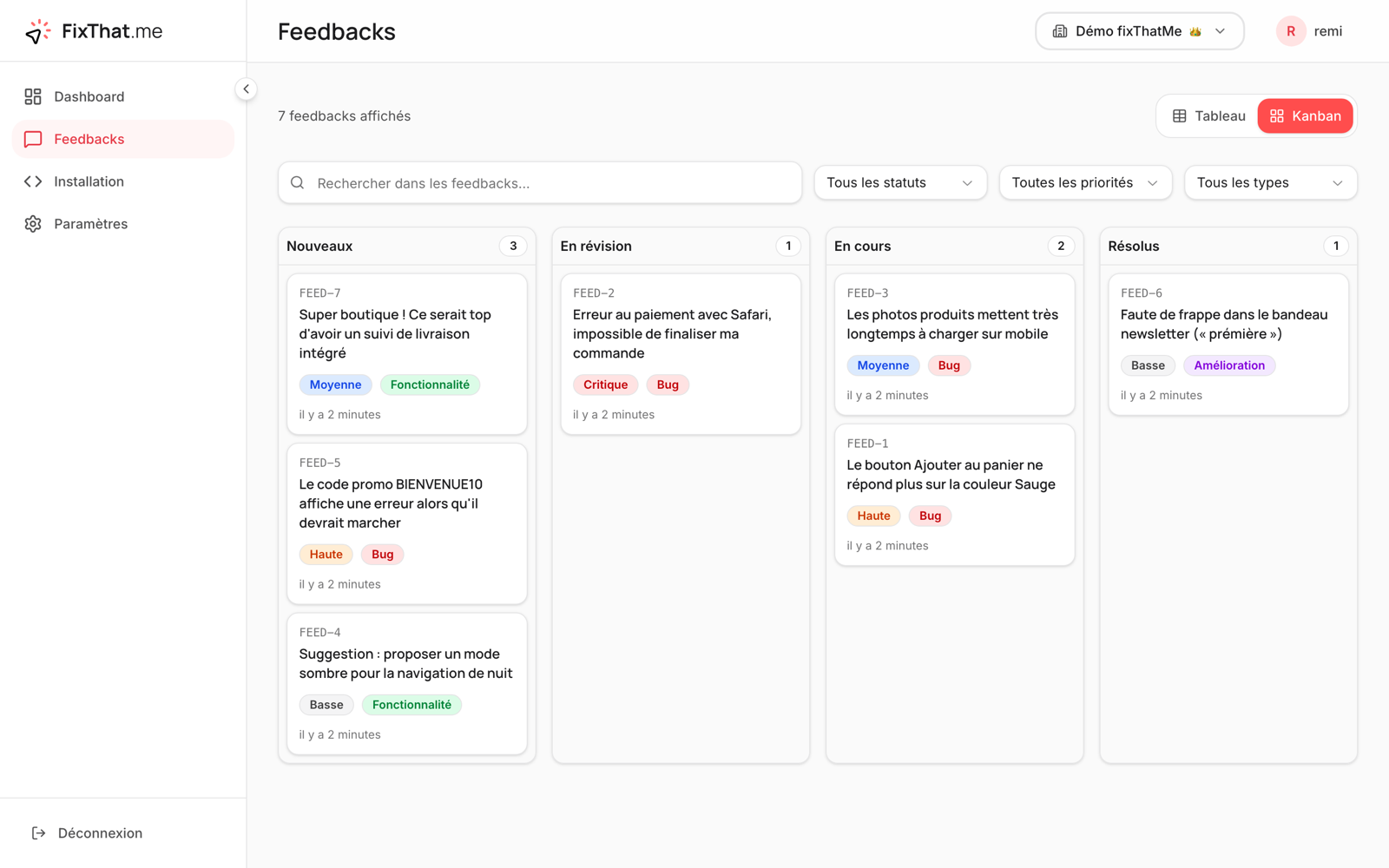
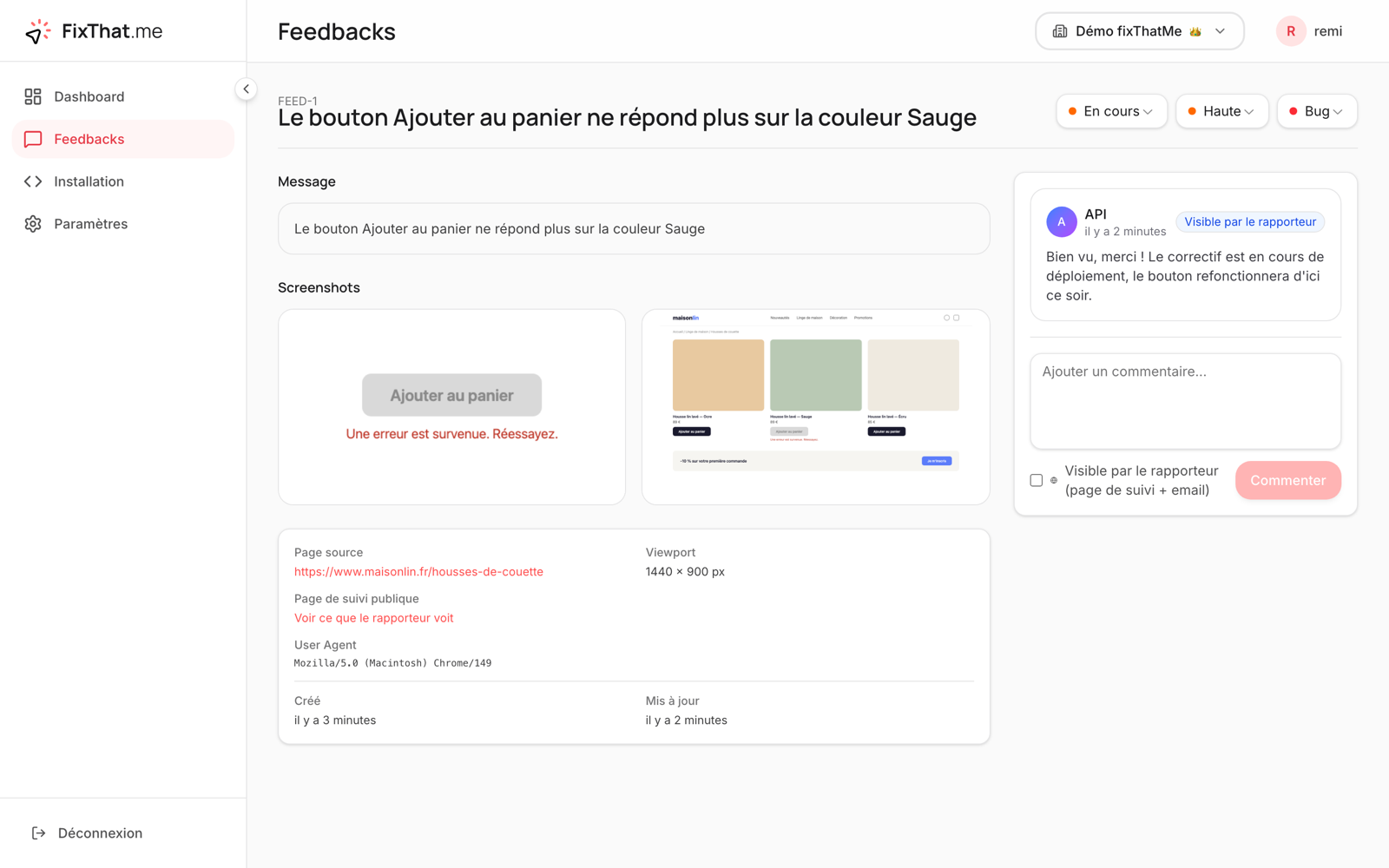
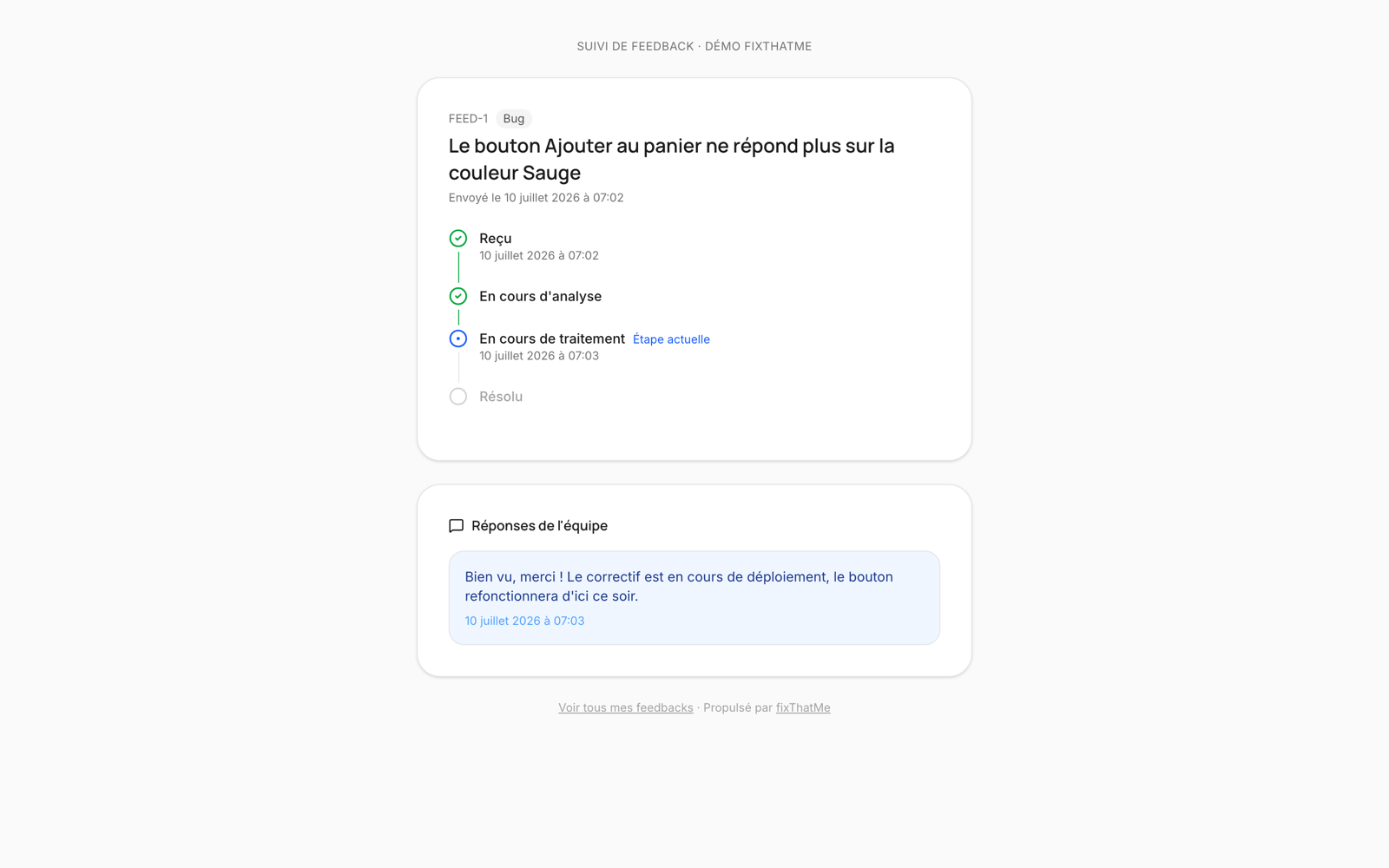
And on your side, what does it look like?
Real product screenshots, not mockups.
Your bugs get fixed while you sleep
The REST API exposes everything: the report, the screenshots, the page HTML at the time of the bug. Hand the docs and a key to an AI agent: it diagnoses, fixes it in your code, updates the status and replies to the reporter. The docs are a plain markdown file you paste into its context.
# Fetch untriaged bugs
curl -H "Authorization: Bearer sk_api_xxx" \
  "https://www.fixthat.me/api/v1/feedbacks?status=new&type=bug"

# Mark as resolved (the reporter is emailed automatically)
curl -X PATCH -H "Authorization: Bearer sk_api_xxx" \
  -d '{"status": "resolved"}' \
  "https://www.fixthat.me/api/v1/feedbacks/{id}"
All the context, no back-and-forth
No more “it doesn’t work” emails. Every report arrives complete.
Automatic screenshots
The selected area and the full page, captured at report time. With the URL, screen size and browser.
Public tracking for the reporter
Every feedback has its tracking page: Received → In review → In progress → Resolved. The reporter is emailed at every step.
Full dashboard
Kanban, list and table views. Statuses, priorities, labels, assignment, internal or public comments.
Notifications & integrations
Email to the team, Slack, Discord, Teams, Google Chat, plus HMAC-signed webhooks with automatic retry.
API built for AI agents
Give your agent the docs and a key: it lists bugs, reads the context, fixes them, updates the status and replies to the reporter.
Multiple organizations
One account, many sites. Each organization has its own widget, members, keys and integrations.
The loop closes, automatically
The worst part of a bug report is the silence that follows. With fixThatMe, the person who reports gets a tracking link, sees progress in real time, and is emailed when it’s fixed — without you doing anything more than changing the status.
- A public tracking page per feedback, no account
- Email to the reporter on every status change
- Public team replies, visible on the tracking page
- A “My feedback” page listing all their reports
Frequently asked questions
Does the widget slow down my site?+
No. The script is 48 KB, loads lazily after your page, and never blocks rendering. The screenshot is only generated when a visitor sends feedback.
Where is the data and the screenshots hosted?+
On Cloudflare infrastructure (database and storage), with automatic backups. Screenshots are only accessible to your organization and, for their own feedback, to the reporter through their tracking link.
Is it GDPR-compliant?+
Yes. No tracking cookies, no data resold. The reporter’s email is optional and used only for progress notifications. The details are in our privacy policy.
Which sites is it compatible with?+
All of them: WordPress, Shopify, Webflow, React, Vue, static sites… If you can paste a <script> tag before </body>, fixThatMe works. No dependencies, no build step.
How much does it cost?+
It is free during the beta, no credit card and no artificial limits. Beta accounts will be warned well in advance if a paid plan launches.
What does the person reporting a bug see?+
After sending, they get a public tracking link: a progress timeline (received, in review, in progress, resolved), public replies from your team, and email notifications if they left their address. Your internal comments stay private.
How do I connect an AI agent to it?+
Each organization has a secret API key. Give your agent the docs (fixthat.me/api-docs.md) and the key: it can list bugs, read the full context (including the page HTML at report time), fix them, change statuses and reply to the reporter.